Answering your search for reliable bow thruster control panels, this guide compares top options by type and use case. The best pick varies by vessel size, preferred control style, and installation space. This overview highlights panels from Vetus and Sleipner that suit different mariner needs—from joystick comfort to compact touch interfaces. Ideal buyers include independent captains seeking precise thruster control, installers prioritizing easy mounting, and boat owners upgrading to an integrated thruster system. Below is a quick summary of five strong choices.
| Product | Best For | Key Benefit |
|---|---|---|
| Vetus BPSE2 Bow Thruster Panel W/Buttons & Time Lapse | Moderate-sized boats needing reliable push-button control | Time-lapse delay protects the thruster during reversal |
| Sleipner Control Panel with Joystick (Black) | Direct tactile control on compact to mid-size craft | Comfortable joystick operation |
| Sleipner Dual Joystick Control Panel (Gray) | Double thruster setups requiring separate controls | Dual joystick for independent thruster management |
| Sleipner Bow Thruster Touch Panel | Constrained spaces needing a compact interface | Touch interface with front-side mounting |
| Sleipner Bow/Styrn Thruster Boat Switch | Simple, intuitive control for straightforward setups | Most intuitive control panel option |
Vetus BPSE2 Bow Thruster Panel W/Buttons & Time Lapse

The Vetus BPSE2 panel uses a straightforward push-button layout to operate Vetus bow or stern thrusters. Its built-in Time-Lapse Feature adds a controlled delay when reversing thruster direction, helping to protect the drive system from abrupt shifts. Best for boaters who want reliable, familiar operator controls with a simple installation footprint. Caution: the button layout may be optimal for standard throttle positions but could feel less ergonomic on unusual helm dashboards. This panel is well-suited for owners focused on protection against rapid directional changes.
Sleipner Control Panel with Joystick (Black)

This black joystick control panel from Sleipner is a top-seller for comfortable, direct thruster manipulation. It is designed for standard instrument cut-outs and front-side mounting, with a pre-fitted O-ring seal to protect against moisture ingress. Best for sailors who prefer tactile joystick movement and quick, intuitive thruster direction control. Better for boats without extensive space for multiple control panels. Limitation: single-joystick models may be insufficient for boats that require independent, dual-thruster commands without additional controls.
Sleipner Dual Joystick Control Panel (Gray)

The Sleipner dual joystick panel provides independent control for two thrusters in a single installation. The dual-joystick setup is ideal for boats with stern thrusters, bow thrusters, or twin-install configurations that require distinct control inputs. Best for bigger vessels or those prioritizing precise, simultaneous maneuvering. Choose this if you need separate thrust vectors for port and starboard actions. Limitation: more complex wiring and mounting compared to single-joystick units.
Sleipner Bow Thruster Touch Panel

The Sleipner touch panel offers a compact, modern interface suitable for exposed helm areas with heavy handling. Its round cut-out hole aligns with standard instrument sizing and features front-side mounting with a pre-fitted O-ring seal. Best for boaters seeking a sleek, space-saving solution without bulky hardware. Better for newer installations where a clean, minimal cockpit look is desired. Limitation: touch interfaces can be less responsive under heavy spray or with gloves on in rough seas.
Sleipner Bow Thruster, Joystick (Gray)

The gray joystick panel from Sleipner is designed to deliver comfortable control with a familiar steering feel. It features a standard front-mount design with an O-ring seal and is commonly chosen for easy thumb- or palm-based thruster operation. Best for boats where a reliable joystick is prioritized for smooth, intuitive turns. Limitation: same-potential for crowding if multiple panels are installed in a small helm area.
Sleipner Bow/Stated Thruster Boat Switch
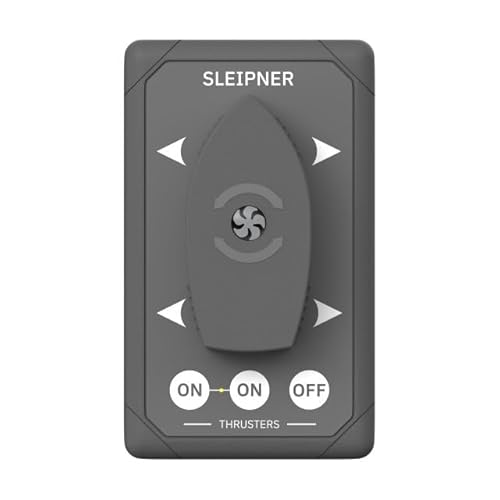
This option emphasizes intuitive control through a simple switch interface. It is described as Sleipner’s most intuitive control panel yet, making it a solid choice for straightforward installation goals and quick responses during close-quarters maneuvering. Best for boats that value a minimal, easy-to-understand control scheme. Limitation: lacks advanced multi-axis or programmable features found in joystick or touch models.
Buying Guide
What control style fits your vessel and crew?
- Joystick panels provide direct, tactile control—good for precise, hands-on maneuvering. Consider dual-joystick setups if you need independent thrusters.
- Push-button panels prioritize simple operation and reliability. They often include protective features like delay timing to reduce wear.
- Touch panels save space and offer a modern look but may require a clean, dry helm area for best performance.
- Boat switches are the simplest option, ideal for straightforward installations and quick, intuitive use.
What installation considerations matter?
- Space and mounting: Front-side mounting with standard cut-outs simplifies retrofits.
- Sealing and protection: O-ring seals protect against moisture in exposed helm areas.
- Power and wiring: Ensure compatibility with existing thruster systems and wiring harnesses.
- Future expansion: If you plan to add another thruster, consider a dual-joystick or additional panel compatibility.
How to choose by boat type and use case?
- Small to mid-size craft: A single joystick or push-button panel may suffice and keep cockpit clutter low.
- Vessels with twin thrusters: A dual joystick panel can streamline control and responsiveness.
- Owners prioritizing modern aesthetics: A touch panel delivers a compact, contemporary look with intuitive controls.
FAQ
- What is the Time-Lapse Feature on Vetus BPSE2?
- How does a dual joystick panel improve handling?
- Are touch panels weatherproof for exposed helm areas?
- Can I mix control types on the same vessel?
- Which panel is best for beginners?
Answers: The Time-Lapse Feature delays reverse thruster action to protect the system. A dual joystick setup allows independent control of two thrusters, improving maneuverability in tight spaces. Many touch panels include seals for weather resistance, but performance can still vary with gloves or spray; verify IP ratings. Mixing control types is possible in some installations but requires proper planning and compatibility. For beginners, push-button panels offer straightforward operation, with fewer variables to learn than joystick or touch systems.